
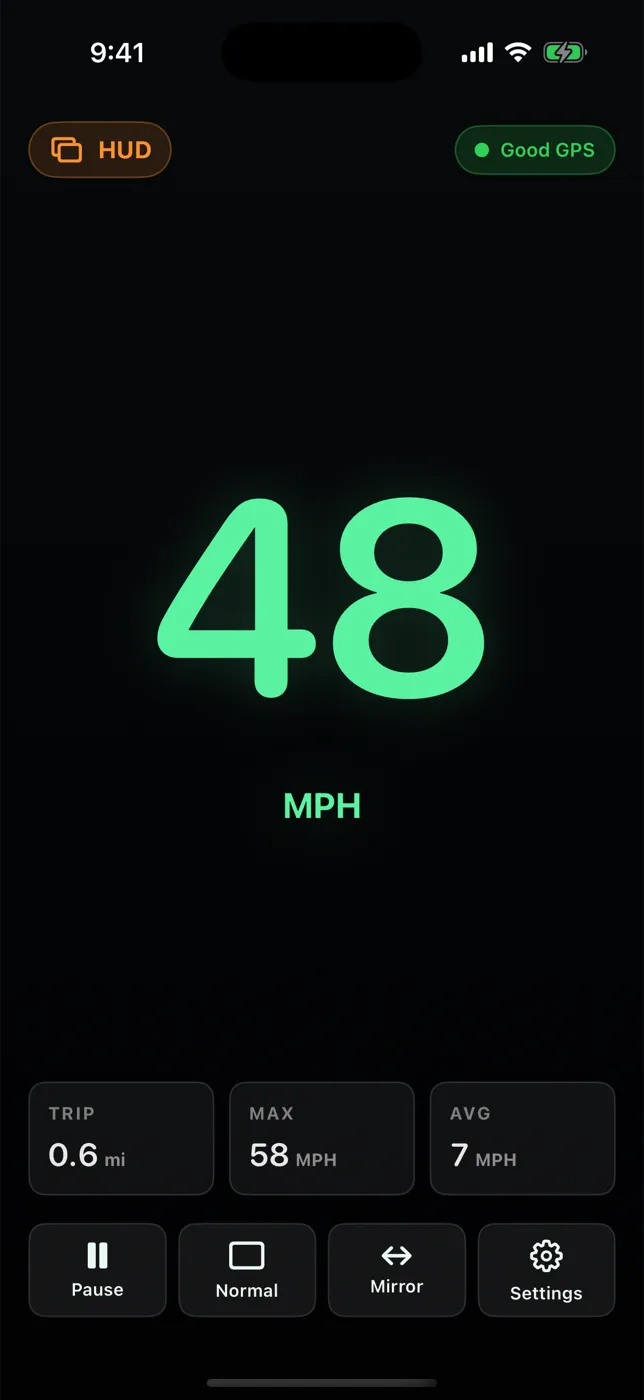
What HUD mode shows
- Large green speed digits on a black background, with the unit
- GPS status
- Trip distance, max, and average in small tiles
- Buttons: Pause/Resume, Normal, Mirror, Settings
How a phone HUD works
A phone lying flat on the dashboard reflects in the windshield like a dim mirror. Because reflections reverse the image, the app flips the display horizontally so the numbers read the right way round. It is the same idea as dedicated HUD gadgets, using the screen you already have.
When it works well — and when it doesn't
- Best at dusk and night, when the reflection has contrast.
- Weak in bright sun; the reflection washes out. Use the normal display, mounted, instead.
- Steep, laminated, or coated windshields can create a double image.
- The phone must lie securely — a non-slip dash mat or mount — and never slide or block vents, airbags, or your view.
For setup steps, read using HUD mode safely.
Driving safely
Set units, mode, and brightness while parked. Mount the phone securely where it does not block your view and where local law allows, then leave it alone while the vehicle is moving. ClearSpeed is an informational display; your vehicle's speedometer and posted signs remain the reference.
Try it on your next trip
ClearSpeed GPS is $3.99 once in the U.S. App Store, with no subscription, in-app purchases, or ads. View ClearSpeed GPS on the App Store.